🔗 Useful Links and Common Errors
This page provides a collection of useful links for setup and solutions for common errors you might encounter.
🔗 Useful Links
Required Software and Dependencies
- SQL Database: Download SQL Database
- NET Framework 4.7.2: Download .NET Framework 4.7.2
- Microsoft Visual C++ Redistributable (x64): Download VC_Redist.x64.exe
- Microsoft Visual C++ Redistributable (x86): Download VC_Redist.x86.exe
⚠️ Common Errors and Solutions
Error 140
If you encounter Error VCRUNTIME140 when trying to run the application, this is typically related to missing Visual C++ Runtime libraries.
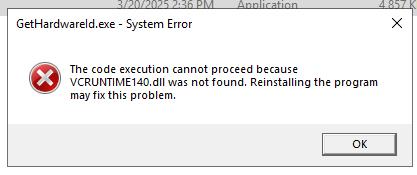
Solution:
-
Download and install the Microsoft Visual C++ Redistributable:
- For 32-bit systems: Visual C++ Redistributable x86
- For 64-bit systems: Visual C++ Redistributable x64
-
After installation, restart your computer.
-
Try running the application again.
If the error persists, ensure that all other required dependencies are installed correctly, especially the .NET Framework.